What Is a Journey?
The Problem With Compliance Checklists
Most compliance tools give you a list of 60+ controls and tell you to start checking boxes. The problem: many controls overlap, the order doesn't matter to the tool, and you end up doing redundant work across frameworks.
How ClearPath Journeys Work
A Journey is a guided sequence of compliance activities designed so that completing one activity satisfies multiple controls at once -- often across multiple frameworks simultaneously.
For example, writing your Information Security Policy satisfies:
- CC1.1 (SOC 2 -- Control Environment)
- A.5.1 (ISO 27001 -- Information Security Policies)
- GV.PO-01 (NIST CSF -- Governance Policies)
You write the policy once. ClearPath maps it everywhere.
Journey Stages
Your Journey is broken into stages that build on each other:
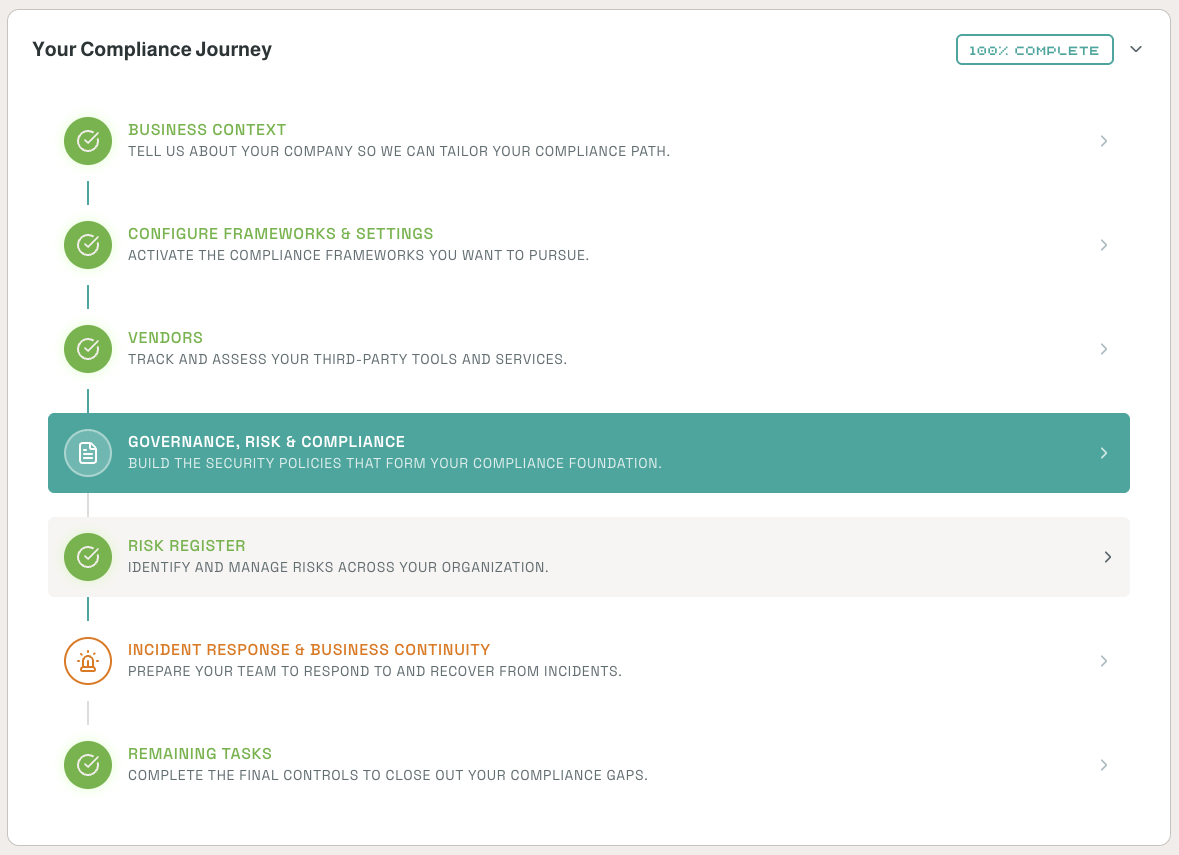
- Business Context -- Tell ClearPath about your company to tailor your compliance path
- Configure Frameworks & Settings -- Activate the compliance frameworks you want to pursue
- Vendors -- Track and assess your third-party tools and services
- Governance, Risk & Compliance -- Build the security policies that form your compliance foundation
- Processing Integrity (if enabled) -- Ensure system processing is complete, valid, accurate, and timely
- Privacy (if enabled) -- Manage how personal information is collected, used, and disclosed
- Risk Register -- Identify and manage risks across your organization
- Incident Response & Business Continuity -- Prepare your team to respond to and recover from incidents
- Remaining Tasks -- Complete the final controls to close out your compliance gaps
Complete Once, Comply Everywhere
If you're working toward multiple frameworks, ClearPath's crosswalk system automatically credits completed activities across all active frameworks. You don't repeat work.
Where to Find Your Journey
Click Home in the left sidebar. Your Compliance Journey is always displayed there -- completed stages show a green checkmark, your active stage is highlighted, and upcoming stages are listed below. Click any stage to open it.